
neoROSET

Kawasaki Robotics neoROSET


neoROSET brings robot programming and highly accurate simulation to your PC. Build your layout, create robot programs, check reach and interference, simulate movements and cycle times, and prepare your application before making changes to the real system.

The result: Less time spent teaching and troubleshooting on the shop floor, fewer surprises during commissioning, and more productive robot uptime.


Less downtime

Program and verify robot applications offline instead of relying solely on teaching and checking on the actual machine.

Faster commissioning

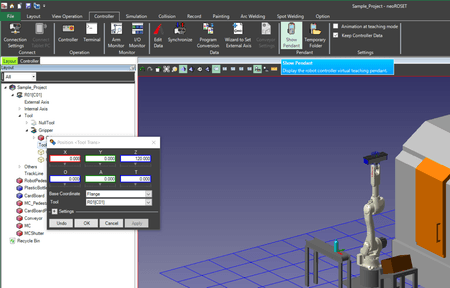
Check layouts, robot reach, interference and cycle times before installation and identify potential issues earlier. With its ribbon menu inspired by common office tools as well as the intuitive placement of commands and workflow, neoROSET is very easy to learn and use.

Easier programming

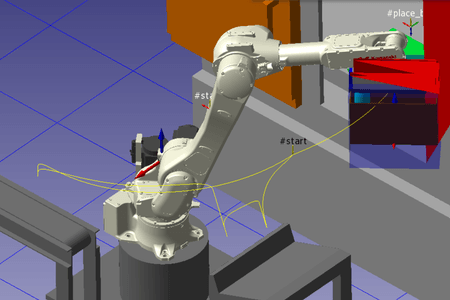
Create programs visually with an intuitive graphical interface and use CAD geometry directly for teaching. All models and objects easily be moved based on surfaces, edges, vertices, midpoints of lines and more – making programming faster and far more convenient.

More confidence before implementation

Simulate robot movements, peripheral equipment, external axes and signals in a virtual environment that closely reproduces the real system.

Easy export into 3D PDF files

Each simulation can be exported as complete 3D PDF files. This allows customers and partners to have a detailed look from any angle – streamlining communication.

All common file formats supported

Direct import of all common 3D file fomats is supported, requiring no prior conversion – effectively saving time and resources.


01. Plan your cell

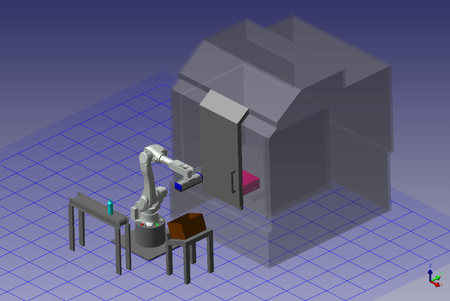
Import your CAD data, add robots and workpieces and test different layouts. Check whether the robot can reach the required positions before the physical cell is built.

02. Program visually

Create teaching points directly from CAD geometry and build Kawasaki robot programs using a graphical environment and AS Language Editor.

03. Simulate and verify

Run the application virtually. Check robot trajectories, tact times, interference, signals, peripheral equipment and external axes.

04. Transfer to the real system

Load programs created in neoROSET to the actual machine and use robot posture and signal monitoring to support final adjustments.


And more time producing with it.

Traditionally, layout verification, programming, interference checks and adjustments can require substantial work directly on the robot system. neoROSET moves much of this work into the virtual environment.

Reduce the time required for conventional offline teaching and adjustment to a fraction.


Notice issues before they become problems.

A collision discovered during simulation is a problem to solve. A collision discovered during commissioning is downtime. neoROSET lets you verify interference and operating ranges on your PC before implementation. Kawasaki’s virtual controller technology also enables highly accurate reproduction of robot movement trajectories and tact times.

With neo ROSET you can easily verify elements such as:

  • Reach: Can the robot actually reach every required point?
  • Interference: Will robots, tooling or equipment collide?
  • Cycle time: Will the planned process achieve the required tact time?


Everything you need to take your robot application virtual

Accurate trajectory & tact-time simulationMulti-robot simulationExternal-axis simulation
Interference & layout verificationAS Language EditorProcessing-result visualization
Line TeachingCAD file import3D PDF export


Don’t rebuild what already exists. neoROSET supports a wide range of commonly used CAD formats, allowing engineering data to flow directly into layout planning and robot programming. The formats include:

  • STEP
  • IGES
  • CATIA
  • SolidWorks
  • Inventor
  • NX
  • JT
  • Parasolid
  • AutoCAD/DWG/DXF
  • Solid Edge
  • Rhinoceros
  • Pro/E
  • ACIS

neoROSET is not just designed to create new automation processes. It allows you to conveniently optimize, expand and modernize existing applications.


Visualize existing installations

Load save data from an actual robot controller and recreate the on-site system in neoROSET — including coordinates and teaching-point positions that may be difficult to inspect physically.

Modify programs more efficiently

Shift and mirror-copy functions support teaching-point conversion and program correction during on-site adjustment.

Plan robot replacements

Replace robot models virtually to evaluate model selection when modernizing aging robot installations.


neoROSET is an extremely versatile and powerful tool – it supports:

System Integrators
Design, program and validate more of the cell before commissioning.

Robot Programmers
Create and modify programs away from the physical robot.

Production Engineers
Evaluate layouts, reach, interference and cycle times before making changes.

Maintenance & Service
Recreate existing systems virtually to support troubleshooting, modification and modernization.

Sales / Project Engineering
Use 3D simulations to communicate proposed robot concepts before implementation.


Traditional WorkflowWith neoROSET
Check reach on the real systemVerify reach virtually
Discover interference during setupCheck interference beforehand
Program mainly at the robotPrepare programs offline
Stop equipment for checkingSimulate without stopping the machine
Correct issues during commissioningIdentify issues earlier
Estimate cycle behaviourSimulate trajectories and tact times


A dedicated neoROSET course is available through the Kawasaki Robotics Academy, with training focused on creating programs and simulations using the software. Customer-site training is also available according to the brochure.

Ready to take robot programming offline?

Discover how neoROSET can help you reduce programming effort, minimize commissioning risk and get your Kawasaki robot application production-ready faster.